Impakt Tender
Read the tender, check whether you qualify, and draft every answer from your own past bids.
 Watch the walkthrough
The problem
Days spent on every bid.
A small firm answering a council or NHS tender can lose days to it. Someone has to read every document and check whether the firm even qualifies.
Then they rewrite the same case studies against a new set of scoring criteria. The good answers are already in last year's bids, but finding them takes as long as writing new ones.
Walkthrough
From a tender to draft answers.
Recorded on the working product with fictional test data. The waits while it reads have been shortened.
Read what the video shows
- The firm adds a past NHS bid to its library. Each file is split into pieces that keep their heading and page.
- The model suggests the firm's profile, and the bid writer checks and saves it.
- A tender from a fictional Leeds City Council is uploaded and read into deadlines, requirements and questions.
- Each deadline shows the page it came from.
- The advice is no bid, because the firm has £2 million of indemnity cover and the council asks for £5 million.
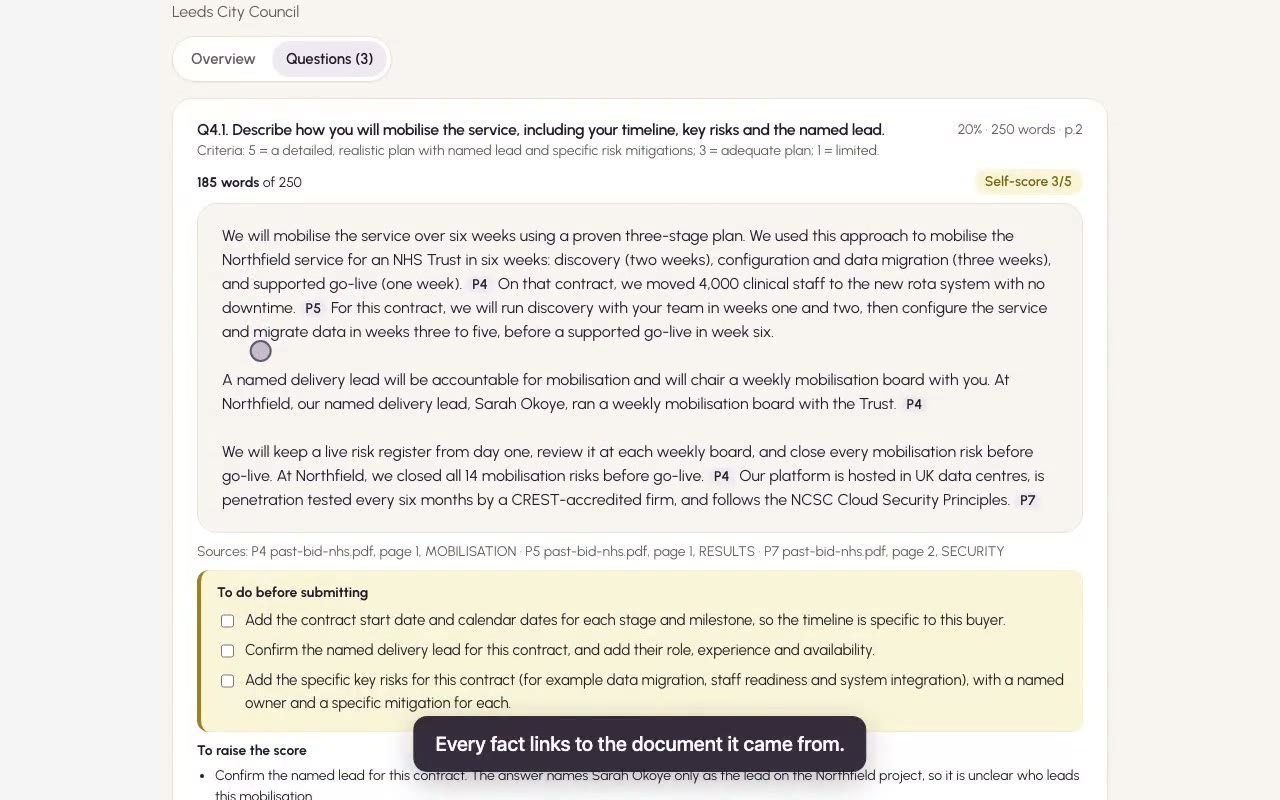
- The model drafts an answer from the library, and every fact links to the document it came from.
- Where there is no evidence, the draft leaves a gap. A second model scores the answer and suggests how to raise the mark.
- The answers download as a Word document, with any open gap marked TO DO.
What it does
Everything the job needs, in one place.
Your own library
Past bids, case studies, policies and CVs, split into pieces with their headings and pages.
The tender, by page
Deadlines, requirements and questions, each checked against the page it came from.
Bid or no bid
Certificates, turnover and insurance checked against the requirements, with the reasons.
Answers with sources
Every fact links to the document it came from. Missing evidence becomes a gap, not a guess.
Scored like an evaluator
Each answer is scored on the buyer's own scale, with changes that would raise the score.
Ready to submit
Answers export to Word, and the deadlines and checklist to PDF.
How it stays right
The draft never claims what you cannot prove.
- A fact needs a sourceA sentence marked as a fact must cite a piece of the library. If its source is missing, it becomes a gap for the bid writer.
- Promises are checked tooA commitment that claims a certificate, a headcount or a result needs a source, just like a fact.
- Word limits are countedWords are counted without the citation markers. An answer over the limit is shortened, or flagged for the writer to cut.
- The decision stays with youThe tool recommends bid or no bid with its reasons, and anything it cannot check is marked for a person.
Checked on the working product
What a real run looks like.
Questions
Questions people ask first.
Will it make up experience we do not have?
No. Every fact must come from your own library. Where there is no evidence, the draft leaves a gap and tells you what is missing.
Does it read the buyer portals?
Not yet. You download the tender documents and upload them. Reading straight from Find a Tender and Contracts Finder is planned.
Does it do the pricing?
No. Pricing schedules stay with the bid manager.
Can buyers tell AI was used?
The Word export includes a short statement on the use of AI, for buyers who ask for one.
Let's make an impact.
Tell us what you are building. We reply within one working day with next steps and a time for a call.